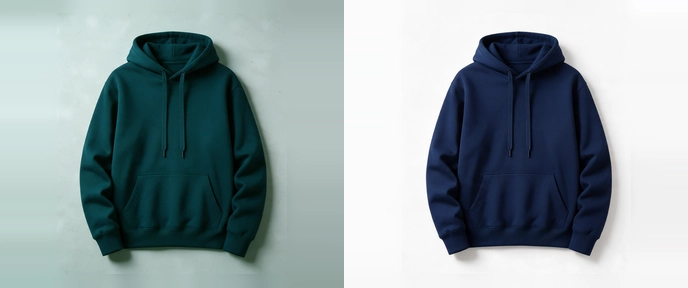
Illustrative example, AI-generated. Left: unedited frame. Right: finished image.
It is the night before the listing goes live. You have 34 edited photos in a folder.
Everything looks fine. Then the agent opens image 19 on her phone and asks, "Why is the living room window pure white?"
Now you are not delivering. You are reopening files at 10 PM.
The editing may be fine. What is missing is a fast, repeatable way to confirm that nothing slipped through. This real estate photo editing checklist is that final review: nine checks, about ten minutes for a typical set, aimed at the problems that cause revision requests and late launches.
At the end, we cover which checks are worth handing to a professional editor, and how ClippingPathService.com handles them.
Who This Checklist Is For
- Photographers processing a full property set against a tight turnaround
- Agents who want listing-ready images without several rounds of corrections
- Brokerages and marketing teams who need every listing to meet the same visual standard, whoever shot it
If you edit your own photos, use it as your final pass. If someone else edits them, use it as your acceptance review.
Why Run a Final Check at All
On listing day you are not learning how to edit. You are checking whether anything got missed.
A quick scroll through the folder will not catch everything. Going through the same checks, in the same order, every time will. Small misses look like this: a crooked door frame in the fifth bedroom shot, a garden hose left in the front exterior, one image noticeably warmer than the rest.
In a gallery, a single photo that looks off, like a tilted room or a white window, is easy to spot next to the others.
The 9-Check Listing Day Review
Open the full set as a contact sheet or grid first. Several of these checks only show up when the images sit side by side.
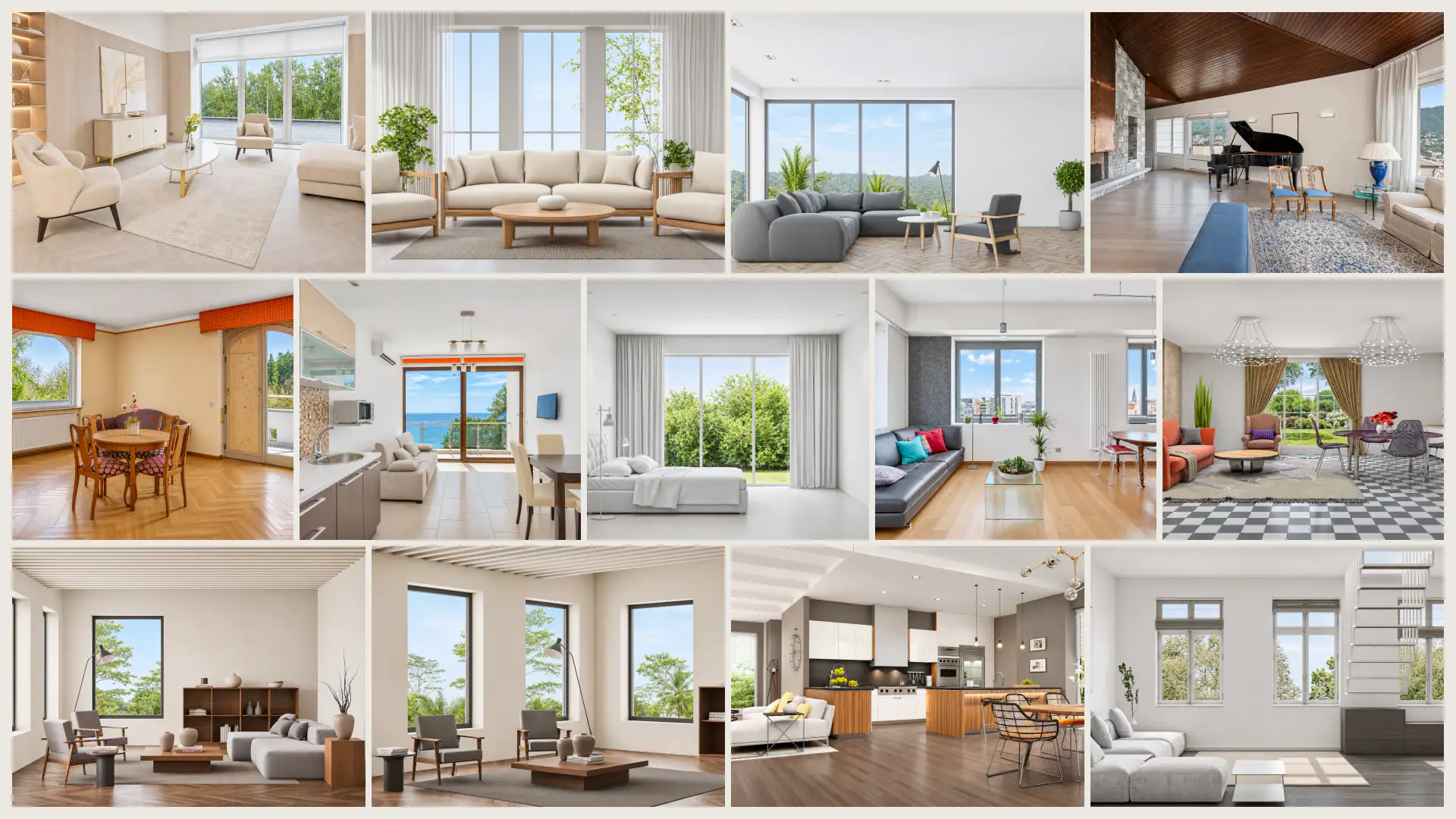
Illustrative example, AI-generated. Viewed side by side, the mismatched image shows immediately.
Check 1: Completeness
Confirm the set is whole before you judge quality.
- Every key room is covered (living areas, kitchen, bedrooms, bathrooms, exterior front and back)
- No duplicates or near-duplicates left in by mistake
- The strongest exterior or living space is the hero image and leads the set
- Order follows how a buyer would walk through the property
Check 2: Exposure
Zoom to 100% on the darkest and brightest areas of each room.
- Shadows are open, not muddy or crushed to black
- Highlights are not clipped on lamps, light fixtures or white walls
- Brightness is similar from room to room
- The image looks bright without looking washed out
Check 3: Windows
Windows are one of the easiest places for an interior edit to go wrong.
- Window panes show a real outside view, not blown-out white or flat grey
- Frames and edges are clean, with no halos or glowing outlines
- Reflections look natural
- The view outside matches the light inside (a dim room with a bright blue sky outside looks fake)
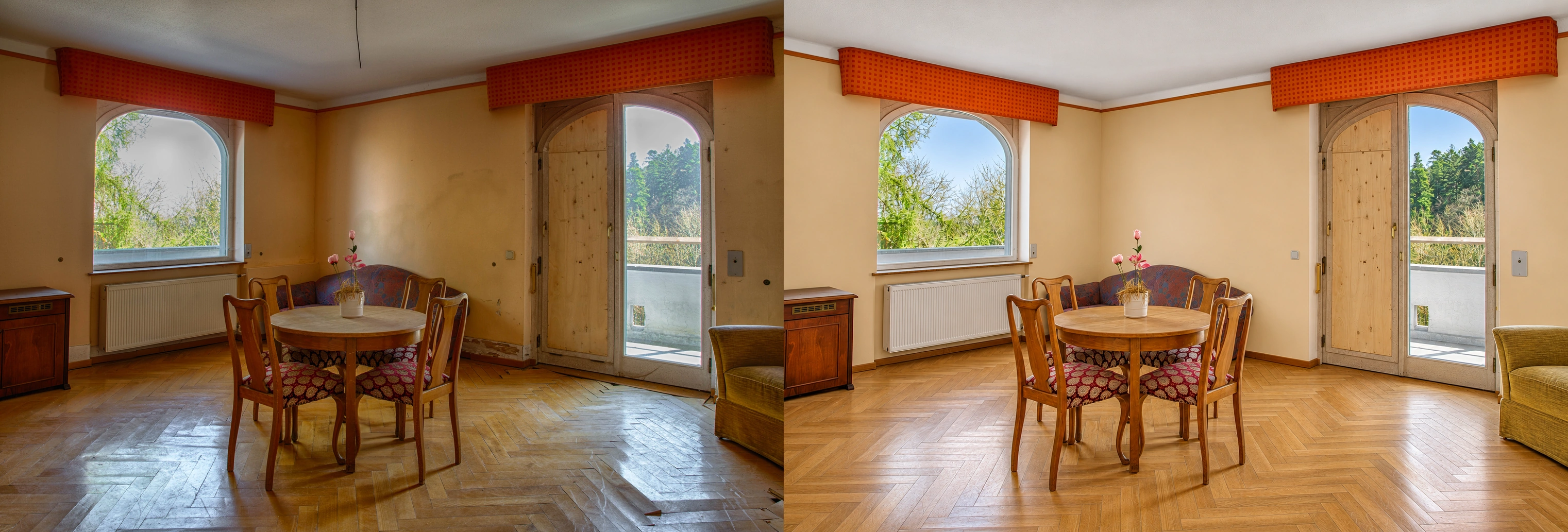
Illustrative example, AI-generated. Left: blown-out window. Right: blended view with clean frame edges.
Check 4: White Balance and Color
- White walls and ceilings look white, not yellow, blue or green
- No color cast from carpet, trees or painted walls bleeding onto other surfaces
- Warmth stays inviting, not orange
- Color temperature matches between rooms, unless the lighting really differs
Check 5: Verticals and Perspective
- Door frames, window frames, corners and cabinets are vertical
- Horizons on exteriors are level
- Wide-angle stretching is corrected, especially at the edges of the frame
- Rooms look spacious, not warped
Tip: Overlay a grid in your editor and scan the left and right edges. Crooked lines are easy to miss until you do.
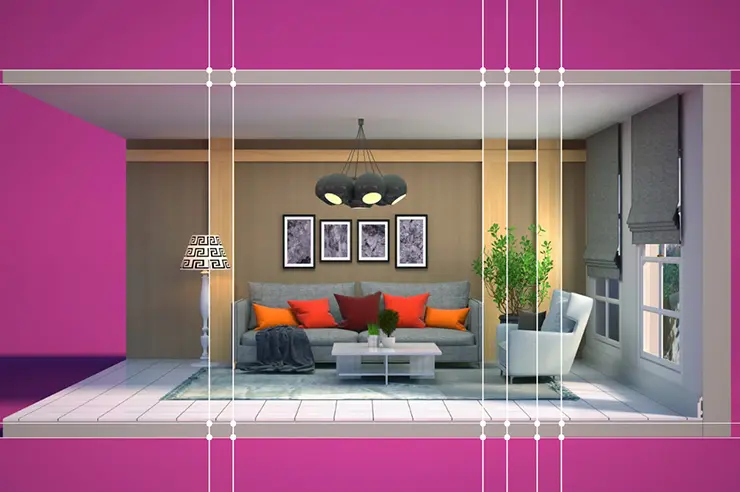
Illustrative example, AI-generated. A grid overlay makes crooked verticals easy to see.
Check 6: Distractions
Use the common rule: temporary items out, permanent features stay.
- Remove: parked cars, trash bins, garden hoses, extension cords, personal photos, clutter, pet items
- Keep and disclose: power lines, neighboring buildings, structural damage, anything a buyer would see on a walkthrough
- Check floors, lawns and walls behind removed objects for smudges or repeated textures
Rules vary by MLS and by market. When something falls in a gray area, check your local rules or ask your agent.
Illustrative example, AI-generated. Temporary items removed, permanent features left honest.
Check 7: Exterior Polish
- Sky looks natural, with sun direction and shadows that match
- Lawn is a believable seasonal green, not neon
- Roof lines, trees and wires are clean where masked
- On a twilight shot, windows glow warmly and the facade is balanced
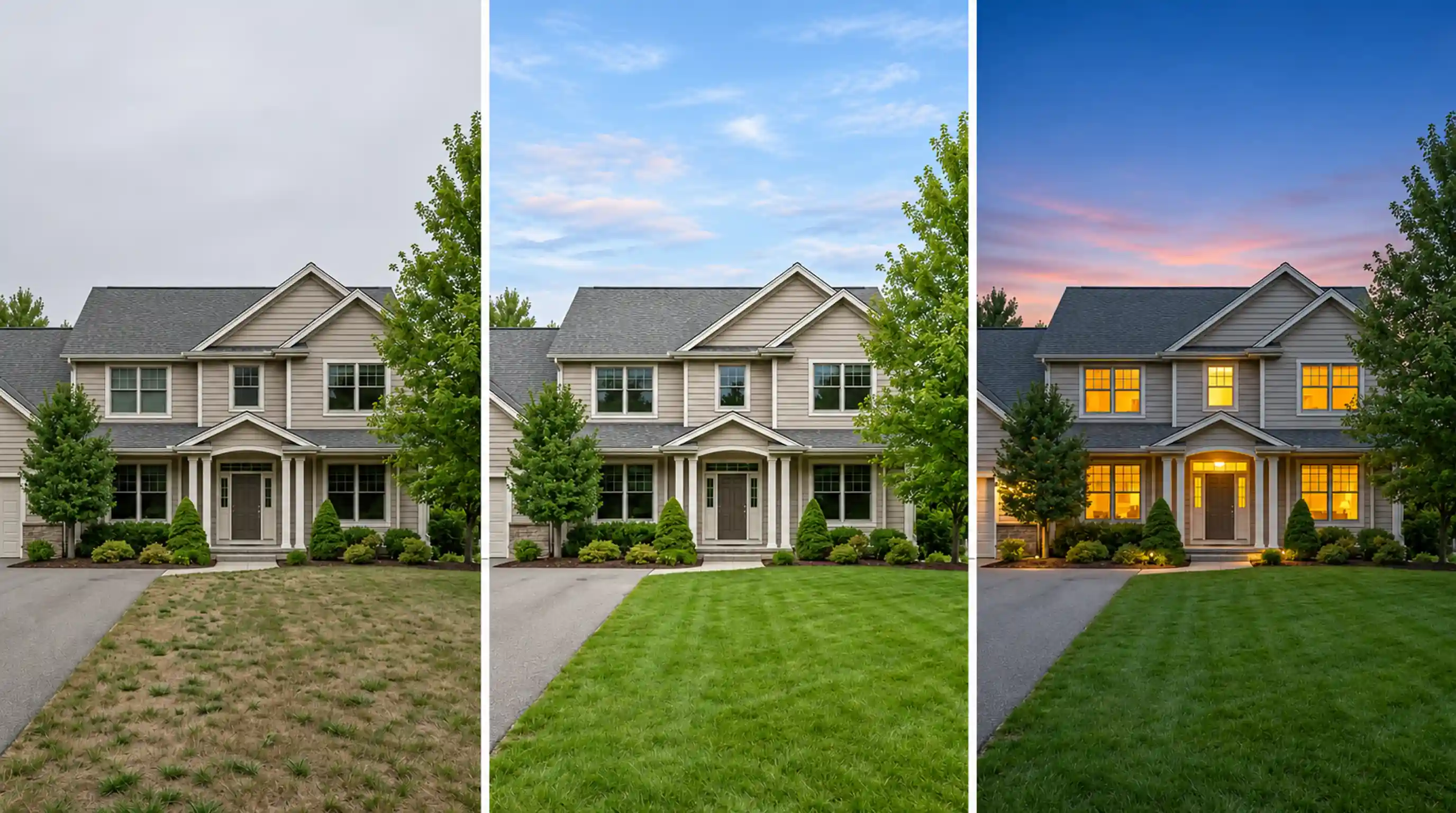
Illustrative example, AI-generated. Same exterior: original, sky and lawn, twilight.
Check 8: Set Consistency
This check is easy to skip when you review images one at a time, because each photo can look fine alone. Side by side, a mismatch shows quickly.
- Put 6 to 8 images next to each other. Does the set look like one photographer's work?
- Brightness, contrast, color and sharpness match
- Crops and aspect ratios are uniform
- No single image is clearly over-edited or under-edited compared with the rest
Check 9: File Readiness
Split this check into three parts, because they have different rules.
Platform requirements (check each one)
- Look up the current image size, format and file-size limits for your MLS, each portal and your own website. They differ, so do not assume one export fits all.
Recommended output settings
- Export in sRGB so colors look the same across browsers and phones
- Use one consistent crop and aspect ratio across the set
- Name files clearly and in walking order
- Confirm the final count matches the planned set
Archive and print
- Keep full-resolution versions if the agent may need print
- Save layered or master files if you expect to revise later
The 10-Minute Version
When time is short, run these five in order:
- Contact sheet scan for consistency (Check 8)
- Windows in every interior (Check 3)
- Verticals on every image (Check 5)
- Temporary distractions in exteriors and kitchens (Check 6)
- Export check against your platform limits (Check 9)
These five are quick to check and show up right away in a finished gallery: blown windows, crooked lines, stray clutter, mismatched images and files that will not upload cleanly.
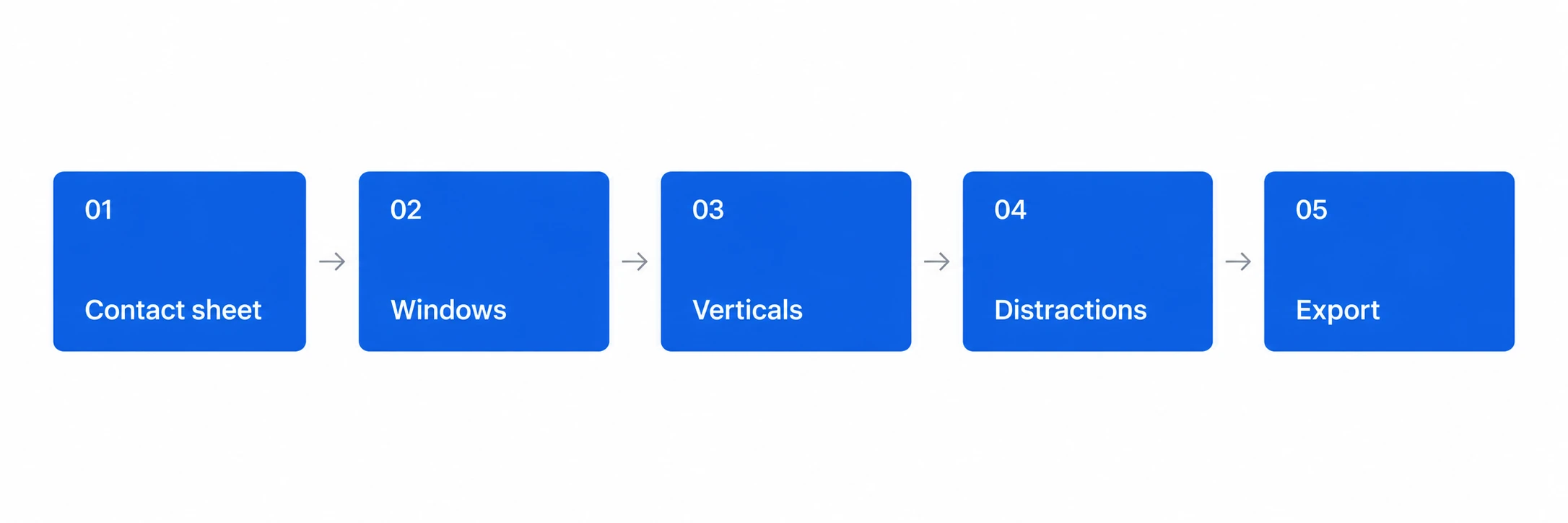
The 10-minute review, in order.
Where the Checklist Exposes Your Bottleneck
Run this checklist on a few listings and a pattern shows up. Some checks take seconds. Others can take far longer than the rest of the review combined.
The slow ones are usually:
- Window blending on bracketed shots (Check 3)
- Perspective repair on heavily distorted rooms (Check 5)
- Object removal where the floor, lawn or wall must be rebuilt (Check 6)
- Sky replacement and lawn greening that must look real (Check 7)
- Day-to-dusk conversion (Check 7)
- Keeping one look across a whole batch (Check 8)
These are skill-heavy, repetitive and tied to a deadline, which makes them the natural candidates to hand to a professional editor. The next section covers how ClippingPathService.com handles them.
How ClippingPathService.com Handles the Time-Consuming Checks
ClippingPathService.com is a hand-editing service for photographers, brands and production teams, with a real estate editing service for listing photos.
A note on scale: the figures below are company-wide numbers reported by ClippingPathService.com across all its editing work. They are not real estate only figures.
- 78,066+ projects delivered
- 450+ global brands and retailers served
- 200+ retouchers on the team
- A 3-step quality control process that includes human review
How the service maps to the checklist
| Checklist item | What CPS does |
|---|---|
| Exposure and windows (Checks 2 and 3) | Manual HDR blending of 3, 5 or 7 exposures, with the window view pulled from the darkest frame and interior and exterior light balanced. Automated merges are avoided because they tend to produce halos, grey windows and flat color. |
| Color (Check 4) | Color cast removal so rooms look the way they did in person |
| Verticals and perspective (Check 5) | Perspective and lens correction that straightens verticals, levels horizons and removes wide-angle distortion |
| Distractions (Check 6) | Temporary clutter, cars, bins, hoses and cords removed, with the surface rebuilt behind them. Permanent features and anything that could misrepresent the property are flagged for you and your agent to decide. |
| Exterior polish (Check 7) | Sky replacement, lawn greening and day-to-dusk twilight conversion done by hand, matching sun direction, color temperature and reflections |
| Consistency (Check 8) | Send a few of your best edited photos or a short spec (brightness, window pull, sky preference, warmth) once. A dedicated team applies it to every batch, and settings are saved for repeat orders. |
| File readiness (Check 9) | sRGB JPEGs sized for MLS, Zillow and your listing site, with full-resolution files and layered PSDs available on request |
Turnaround
- Overnight delivery and standard 48-hour delivery are both included at no extra cost. Upload after an afternoon shoot and the edited set is back before a 9 AM listing.
- Faster options for urgent jobs: Prompt (10 hours, +70%), Rush (4 hours, +200%) and Express (1 hour, +300%).
- You can send 3 photos free to see the result before sending a full set.
Which Checks to Keep In-House and Which to Hand Off
A simple rule: hand off a check when it takes you longer than the shoot itself, or when the same fix repeats on every listing. Keep the final review either way.
| If this describes you | Do this |
|---|---|
| You shoot 1 to 3 properties a week and enjoy editing | Edit in-house, use the 9 checks as your final review |
| You shoot most days and editing eats your evenings | Hand off windows, perspective and exterior work, keep the final review |
| One type of image slows every job (for example, dusk exteriors) | Hand off only that task and keep the rest in-house |
| You manage several photographers or many listings | Standardize on one saved style spec and one editing team, run Check 8 on every set |
| You have a listing tomorrow and a set that is not ready | Send the toughest images overnight, review the returns against this checklist in the morning |
Whatever you choose, keep the checklist. The editor can change. The final review stays yours.
Final Pre-Publish Checklist (Copy and Reuse)
- Set is complete and in walking order
- Exposure balanced, no clipped highlights or crushed shadows
- Windows show a real, natural view
- White balance clean and consistent
- Verticals straight, horizons level
- Temporary distractions removed, permanent features left honest
- Sky, lawn and twilight look natural
- Set looks like one photographer's work
- Files meet each platform's current limits, exported in sRGB, full-resolution copies saved
Test the Checklist on Your Next Shoot
Send 3 photos from your next property shoot and compare the edits against this checklist before you send the full set.
Or request a quote for your typical shoot and get volume pricing for regular listings.
P.S. Save the checklist above. The next time an image slips through, you will know which of the nine checks would have caught it.