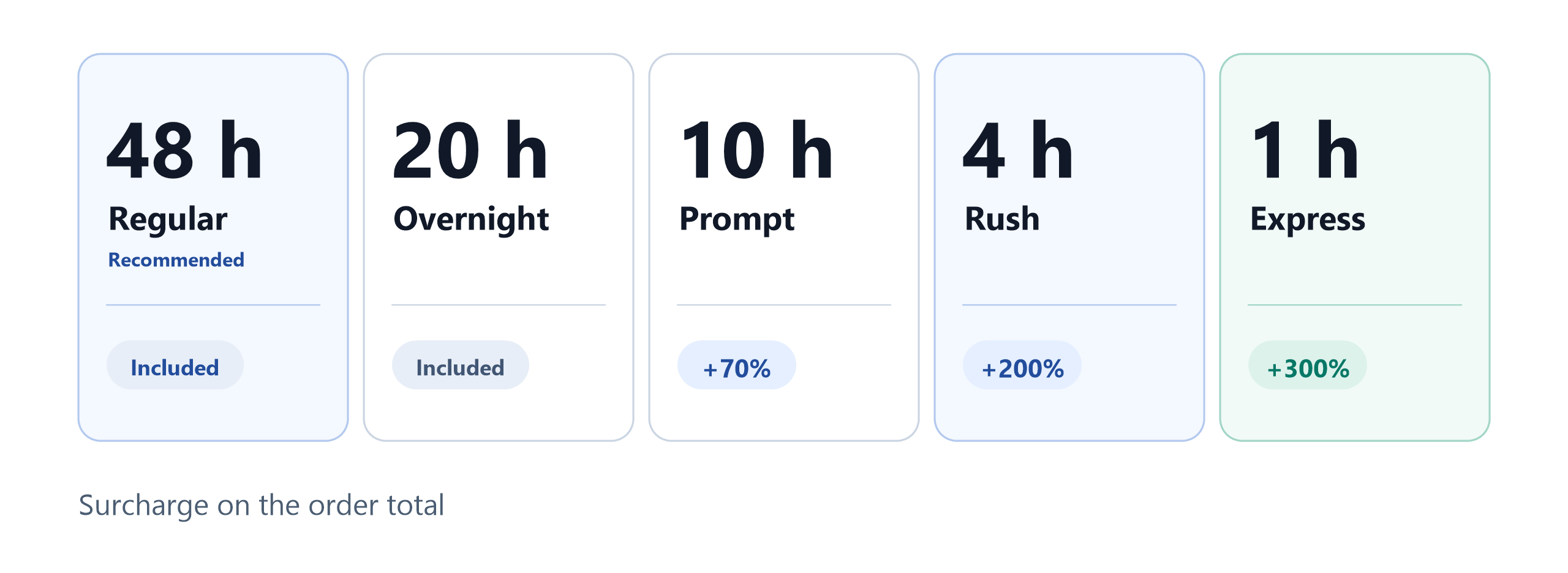
Illustrative graphic of the five current delivery options.
You have 200 product images, a launch on Friday, and an order form asking you to pick a delivery speed.
The fastest option looks safe. It is the quickest, so it must be the smartest choice. You click it, upload the files, and wait.
Then the questions start. Did the clock begin at upload or at payment? Does the turnaround include a quality check? What happens if you ask for one change? Are the images really finished in that window, or just started?
This is a common trap. A turnaround label sounds like a promise. Most of the time, nobody has explained what it is a promise of.
Why a turnaround label is not the whole story
You do not actually want "fast." You want finished, usable images in your hands when your business needs them, without quality problems and without surprises.
That is a different goal, and it changes how you should choose.
A turnaround label is not a block of hours in which one editor works on your files from start to finish. Between your upload and your final download, the work passes through several stages:
- Intake. Your files and instructions are checked and assigned.
- Editing. The actual cutting, retouching, or correction.
- Quality control. A review before anything reaches you.
- Delivery. Files returned in the format you asked for.
- Your review. You look at the set and approve it or request changes.
- Revisions. Any fixes, which add time on top.
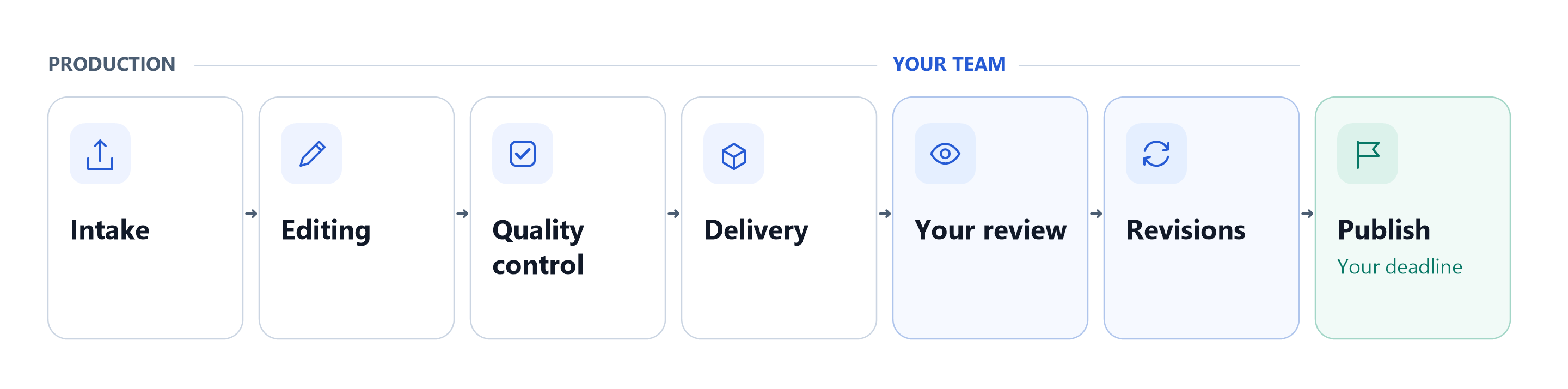
A shorter turnaround compresses these stages. It does not remove them.
A shorter turnaround compresses these stages. It does not delete them. The shorter the window, the more your batch size, image complexity, and instructions matter.
ClippingPathService.com turnaround options at a glance
ClippingPathService.com currently offers five delivery options. 48h is the recommended option, and the faster ones carry a surcharge because they take priority in the production schedule.
| Option | Surcharge | Best for | Suits | What to expect | Limitations and risks |
|---|---|---|---|---|---|
| 48h (Recommended) | None | Planned launches, catalog updates, and client work with a few days of lead time | Any batch size, including large or complex sets | The most room for careful editing, quality control, and your own review | Needs the most lead time in your schedule |
| 20h Overnight | None | Next-morning needs when you can send files by end of day | Small to large batches with standard editing | Delivery within roughly a day, with less slack than 48h | A late brief or a missing reference can eat the margin |
| 10h Prompt | +70% | Same-day deadlines where you can still review before publishing | Small to mid-sized batches with clear instructions | Priority handling in the production schedule | Large or detailed batches leave less room for QC and revisions |
| 4h Express | +200% | Urgent deadlines on a limited set of images | Small batches of simple or well-briefed files | Top-priority handling and a short window | Complex files and big batches may not fit; confirm before ordering |
| 1h Rush | +300% | Genuine emergencies, such as a listing or campaign asset due within the hour | A handful of simple images | The fastest option available, at the highest surcharge | Smallest margin for error; no time for a revision round before your deadline |
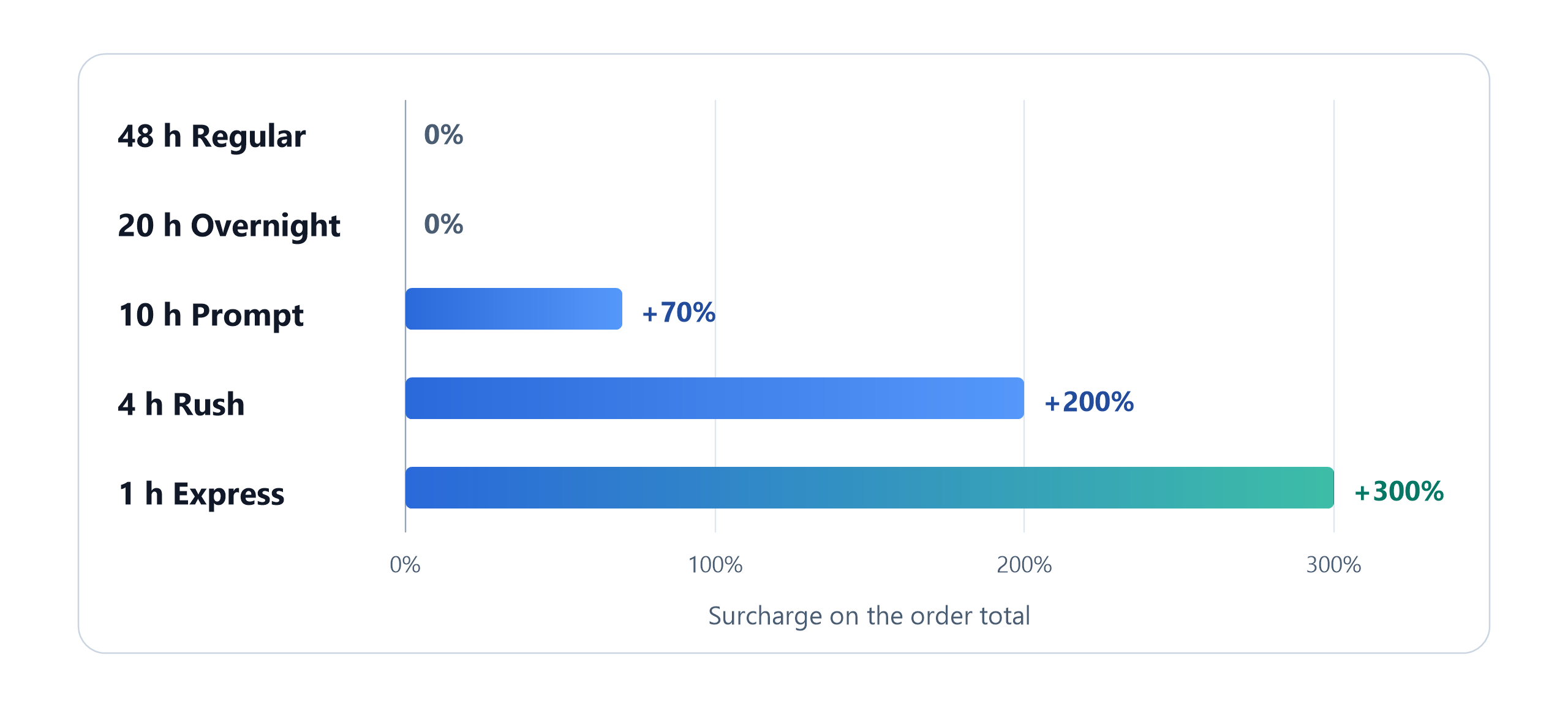
Illustrative chart of current surcharges. Check the pricing page for the latest terms.
The right choice is rarely the shortest one. It is the one that fits your whole workflow, from upload to the moment you publish.
Five things that decide how long your images really take
1. Quantity
10 images and 500 images are not the same job. A window that works comfortably for a small set can be tight for a large one. As batch size grows, a longer turnaround often becomes the more reliable choice.
2. Complexity
A simple background removal on a clean product is quick. A model with long, fine hair, a reflective jewelry chain, or a ghost mannequin composite takes more time per image. If you are unsure which category your files fall into, our guide to clipping path vs image masking explains the difference.
Quantity and complexity work together, and image count alone does not set the turnaround. 500 simple product cutouts can be easier to schedule than a much smaller batch of hair masking, jewelry, reflections, or ghost mannequin work. When you choose a speed, judge the hardest files in the batch, not just the number of files.
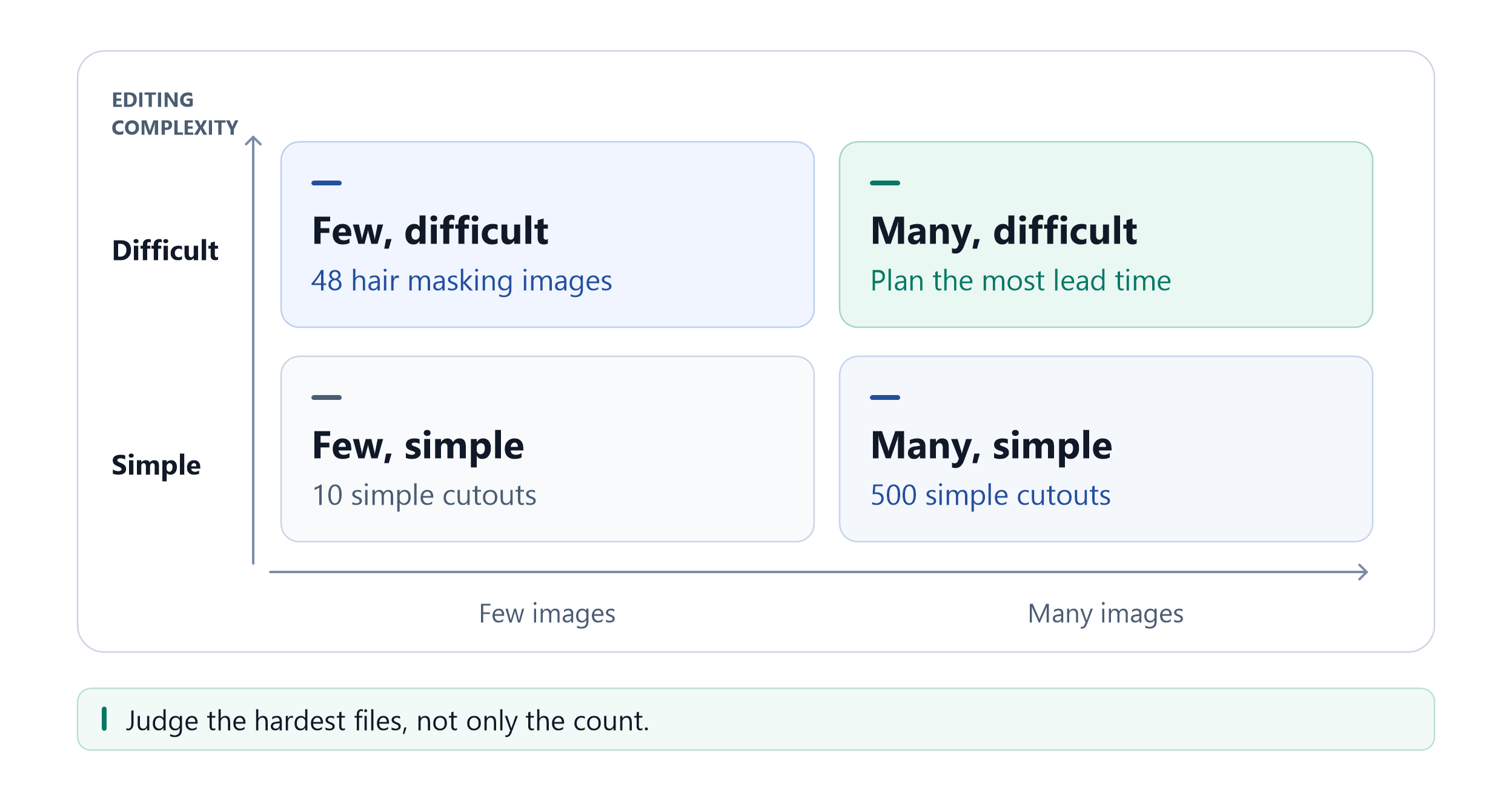
Image count alone does not set the turnaround. Complexity moves the needed lead time just as much.
3. Quality control
Fast does not have to mean unchecked, but a quality review takes time. ClippingPathService.com promotes a 3-step quality control process with human review. A shorter window leaves less slack inside that process, so it works best when your brief is clear and the batch is a size the team can finish without cutting steps.
4. Your instructions
Missing references and vague notes create clarification loops, and every loop adds hours you did not plan for. Clear briefs are the cheapest way to protect a short deadline. Our guide on how to brief a photo editor walks through a simple template.
5. Review and revisions
Ask yourself: "When do I need the final approved files?" Do not ask: "When do I want the editor to finish?"
If you need to review, ask for a change, and publish by Friday noon, your editing deadline is earlier than Friday noon.
How we have served clients with this exact problem
Clients with deadline pressure usually fall into a few groups: ecommerce brands preparing a launch, photographers with a client waiting, agencies running several projects at once, and real estate teams who need photos live on listing day. They share one worry. They are afraid that choosing speed will cost them quality, or that choosing quality will cost them the date.
ClippingPathService.com has completed 78,066+ projects with a production team of 200+ retouchers. Here is what that looks like on a real job.
Case: a jewelry brand with 1,200 images and a tight deadline
The situation. A jewelry brand had finished photography and a large catalog to prepare for launch. The images were difficult: fine chains, reflective metal that threw bright edges, and shadows that had to look believable. And the deadline was tight.
What we did.
- Hand-cut every path. Each cutout was traced by hand, with the edge treatment chosen to suit each piece.
- Split the batch into stages. The work moved fast without lowering the standard.
- Ran a two-stage QA setup. For this particular project, the production team used a first-pass review on every image, followed by a second-editor spot check. This describes that historical project, not a fixed process for every order.
What the numbers show.
- 1,162 of 1,200 images (96.8%) were approved in the first round.
- 38 images needed correction, and they were fixed and re-delivered the same evening.
- The full batch arrived 14 hours ahead of the deadline.
- Total delivery time: 4 business days.
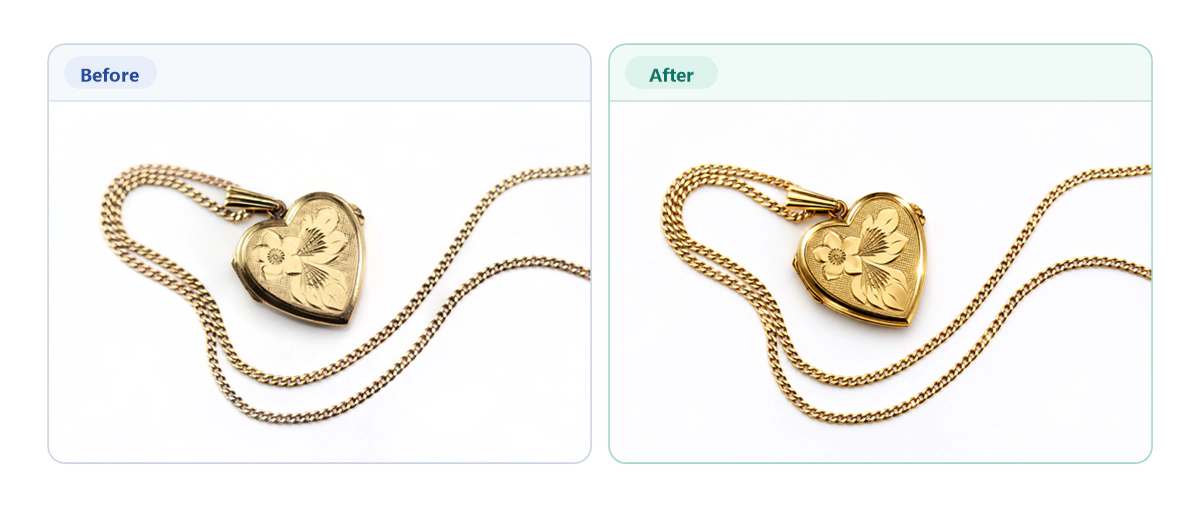
Demo image for layout only. Replace with a real before and after before publishing.
What this case teaches about choosing a turnaround
Notice what this job was not. It was not a one-hour emergency. It was a large, complex batch that was planned realistically, so the team could protect quality and still finish early.
That is the real value of a turnaround you can trust:
- First-round approval matters as much as speed. The share of images that pass first time tells you how much review work lands back on your desk.
- A fast correction loop keeps launches on track. A small number of flagged files is normal at volume. Same-day fixes mean they do not become missed deadlines.
- A buffer is worth more than a faster label. Delivery 14 hours early gave the client time to review the whole set before it went live.
Example: why 48 images of hair can take longer than they look
This is an illustration, not a client project. A 48-image hair-masking batch can still require significant production time when each image has different flyaways, backgrounds, and edge conditions. A single setting cannot be reused across the set, so every image needs its own treatment and its own check. Judging that batch by its count of 48 would underestimate the work.
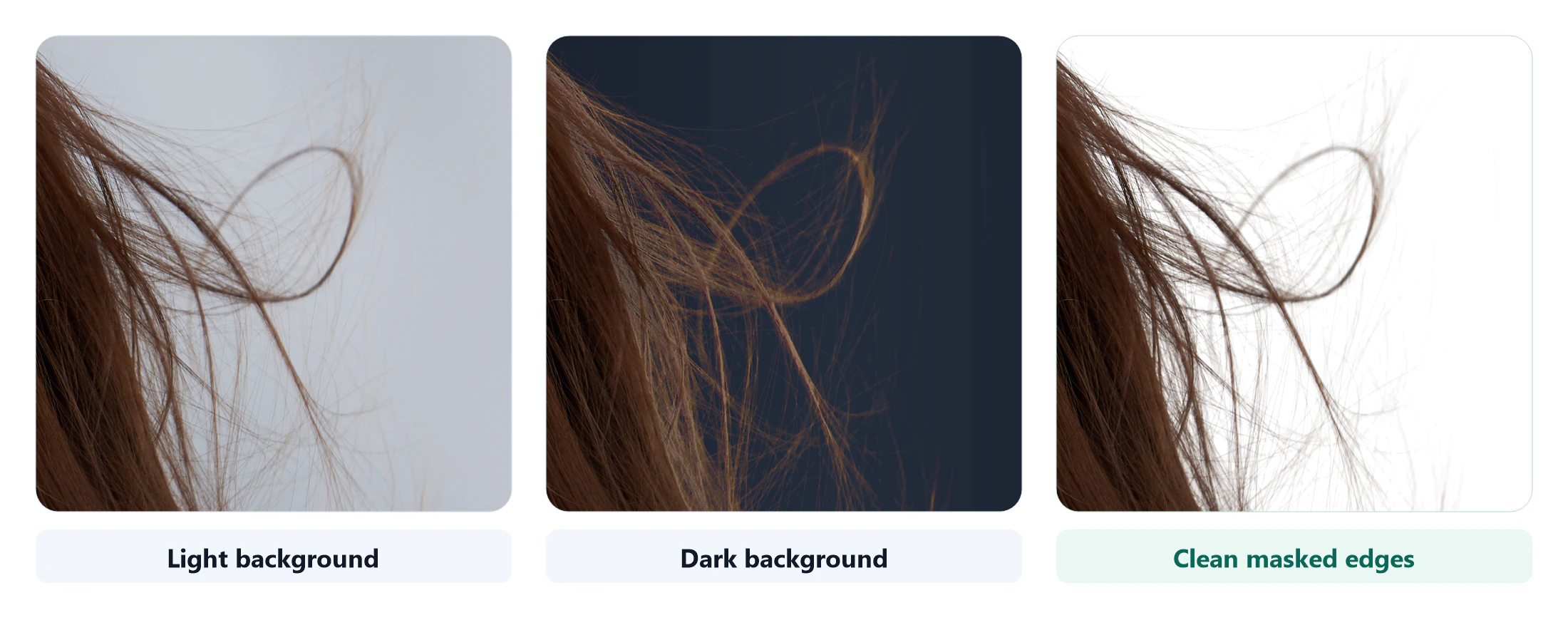
Demo image for layout only. Replace with your own samples before publishing.
When each turnaround makes sense
Choose 48h (Recommended) when:
- Your launch, catalog update, or client delivery is still several days away.
- Your batch is large, or your images need detailed work like hair masking, jewelry, or ghost mannequin.
- You want the most room for quality control and a revision round, with no surcharge.
Choose 20h Overnight when:
- You need files by the next morning and can upload by the end of your working day.
- Your batch is standard work with a complete brief.
- You can reserve time to review before publishing.
Choose 10h Prompt when:
- You have a same-day deadline and a clear brief with references.
- Your batch is small to mid-sized, and you have already approved a style.
- The +70% surcharge costs less than the delay would.
Choose 4h Express or 1h Rush when:
- You have a genuine, immovable deadline, such as a listing going live or a campaign asset due today.
- Your batch is small and the editing is simple or fully specified.
- You accept the +200% (Express) or +300% (Rush) surcharge, and you have no open questions about the files.
When is rush editing worth paying for?
Rush options cost more because they take priority in the production schedule, and the surcharge is added to the base price: +70% for 10h Prompt, +200% for 4h Express, and +300% for 1h Rush. Pay for speed when a missed date costs you more than the surcharge: a launch, a listing, or a client you cannot keep waiting. If your work is evergreen catalog content, a standard option protects your budget and your quality.
Planning a batch one day earlier is often the cheapest way to avoid a rush surcharge, since 48h and 20h Overnight carry none.
Your deadline planning checklist
Before you choose a turnaround, answer these eight questions:
- What is my real publishing or delivery deadline? The time I publish or deliver, not the time I would like the edit to finish.
- How many images are in this batch?
- How complex are they? Simple cutouts, or hair, jewelry, reflections, composites?
- Are my instructions and references complete?
- When does the clock start? Confirm whether it begins at upload, payment, or brief approval.
- How much review time do I need? Add time for approvals and internal sign-off.
- Have I built in a revision buffer? Add time for at least one round of changes.
- Do weekends or holidays fall inside my window?
If you can answer all eight, you can choose a turnaround with confidence.
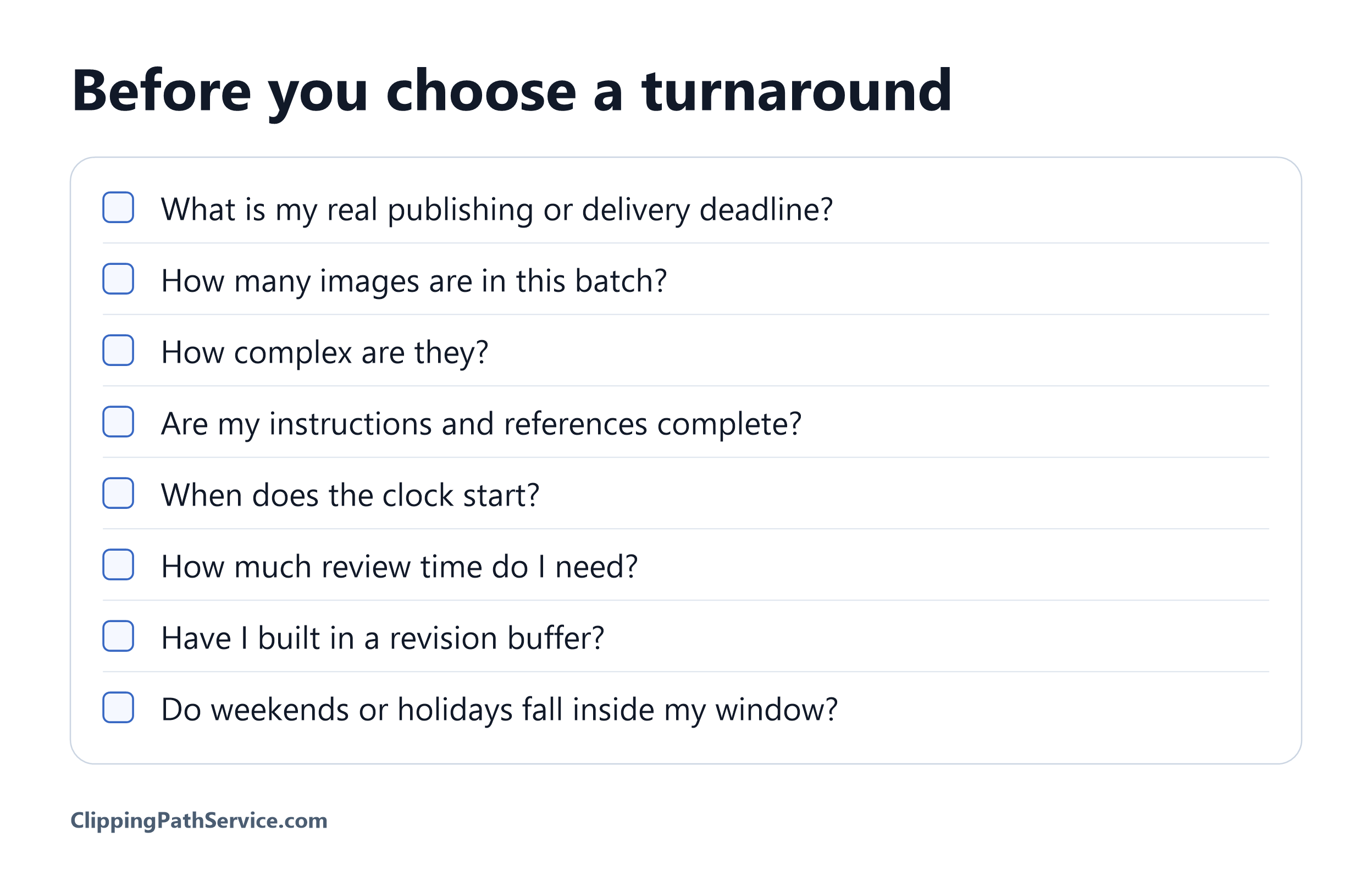
Save this checklist before you place your next order.
Frequently Asked Questions
What does a 1-hour turnaround include? 1h Rush is the fastest option and carries a +300% surcharge for priority handling. The same stages still apply (intake, editing, quality control, delivery), just compressed, so it suits a handful of simple images with a complete brief. Confirm what fits your files before you submit the order.
Is 4-hour delivery realistic for a large batch? It depends on how many images you have and how complex they are. 4h Express is best for limited sets of simple or well-briefed files. For a large batch, ask the team whether your volume fits before you order, or consider sending the most urgent images first and the rest on a longer option.
Is 20-hour overnight delivery included in standard pricing? Current site information lists 48h (Recommended) and 20h Overnight without a surcharge, while 10h Prompt, 4h Express, and 1h Rush carry one. Check the pricing page when you place your order to confirm the current terms.
When does the turnaround clock begin? Confirm this before you submit your order. Do not assume it starts at upload, at payment, or when your brief is approved, because the start point changes your real deadline.
Do revisions add time after delivery? Revisions are additional work after the original delivery, so plan for them in your schedule. Send your change requests in one round when you can, and confirm the revision terms for your order.
Does image complexity affect whether rush delivery is available? Complexity affects how realistic a short window is. Hair masking, jewelry, reflections, and ghost mannequin files take longer per image than simple cutouts. Confirm with the team that your specific files suit a rush option before you order.
Should I choose 48h if my launch is still several days away? Usually, yes. 48h is the recommended option, it carries no surcharge, and it gives you the most room for quality control and revisions. Choose a faster option only when your actual deadline requires it.
Make Your Deadline a Plan, Not a Gamble
You do not need the fastest option. You need the right one for your images, your volume, and your date.
Send us 3 representative images from your batch, including one of the most difficult files, so you can check the editing quality before committing the full order.
3 free images. No credit card required. Planning 500+ images a month? Book a production call and we will price your account.
P.S. Not sure which turnaround fits your batch? Tell us your image count, the type of editing, and your deadline. We will tell you which option works, even if that means a slower, cheaper one.